


TaxBird - Residency Tracker
4.026.00 Reviews
App Specs
- Version
- 2.8.3
- Updated On
- License
- Free
- Downloads
- 10,000+
- Developer
- ware2now
- Categories
- Finance
- Platform
- Android
Screenshots
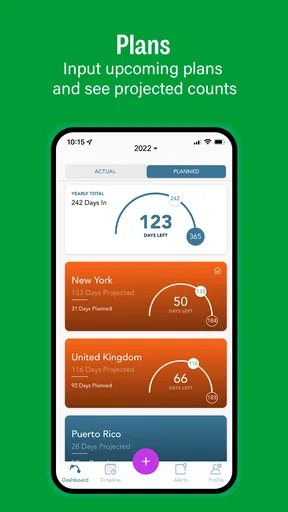
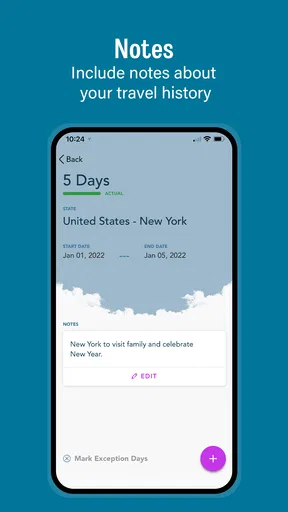
 Analysis by AppCompare
When your year is split between places, “Where was I on that date?” can become more than a memory test. Keeping a dependable day count matters when you have homes in different jurisdictions or travel regularly, but a calendar full of flights and appointments is not always a useful record. I look for a tracker that makes the count easy to review without pretending to settle the tax question for me. TaxBird - Residency Tracker is aimed at that practical task: helping you keep an eye on time spent in different places.
What to decide before you rely on a tracker
Before installing a residency app, I’d first ask what I actually need to track. If the main problem is forgetting travel dates, an automatic day-counting tool may be useful. If I only take one predictable trip each year, a calendar could be enough. And if I need a formal tax conclusion, no day counter should be mistaken for professional tax advice: the relevant rules can depend on more than a simple tally of days.
The distinction matters because a residence tracker is best treated as an organized record and planning aid. It can help me notice that I am approaching a personal or jurisdiction-specific threshold, but I still need to understand which rules apply to my circumstances. I would use its count to prompt a closer look, not as a final ruling on where I owe tax.
Where the app fits into a travel routine
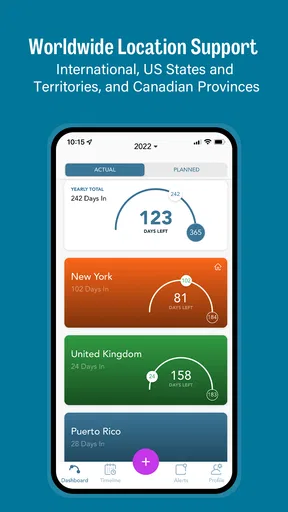
The app is in the finance category, and its focus is narrower than that of a general budgeting or tax-filing tool. ware2now develops it for people who need to count time across international locations, US states, and Canadian provinces. That geographic scope makes it more relevant to someone crossing jurisdictional boundaries than a basic trip diary that records destinations without centering the residency-day question.
A realistic use is a person who spends part of the year at a home in one state, visits family in another, and takes occasional work trips abroad. Instead of trying to reconstruct every stay when tax season arrives, they can check their record as the year progresses and spot dates that deserve a second look. The useful habit is to review the count after travel, while tickets, messages, and other personal records are still easy to find.
For someone managing several trips, I would also keep a separate supporting record of the travel itself. A day count is easier to trust when it can be compared with an itinerary, accommodation receipt, or calendar entry. That is not busywork for its own sake: if a location change looks unexpected, a contemporaneous note may help explain whether the issue was a late flight, a short stop, or a genuinely different overnight stay.
Setting Up: A Breeze
First things first, getting started with TaxBird is as easy as pie. The interface is super intuitive, which I found refreshing. No need to wade through pages of instructions before you can get going. Once you download it, the app guides you through the setup process in a matter of minutes. Simply allow it to access your location data, and you’re good to go. Trust me, even if you’re not tech-savvy, you’ll find it straightforward.
Worth Reading Before You Choose

EA SPORTS FC Mobile 26 Is a Bigger Football Game, but It Takes Time

Flipboard Shows What News Apps Must Do Beyond the Feed

Switching to Android Auto Means Rethinking Your Driving Routine

Google Calendar Makes a Crowded Week Easier to Manage

Ludo King Makes the Most of the Minutes Between Plans

Baby Panda World Brings Quick Play to Modern Phones, but Its Game Library Feels Busy
How It Works
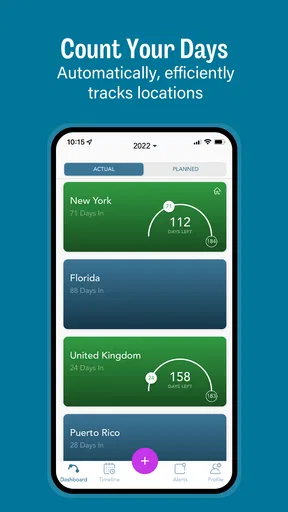
The magic of TaxBird lies in its simplicity. It automatically tracks your location in the background using GPS and logs the days you spend in different states. This feature is particularly useful if you have residences in multiple locations or if you travel often. The app does all the heavy lifting, so you won’t have to worry about manually entering your whereabouts.
What I found really neat is the monthly overview feature. It gives you a bird’s-eye view (pun intended) of where you’ve been. You can see a detailed breakdown of your residency days, making it a breeze to stay on top of any potential tax liabilities. Want to avoid spending too many days in a high-tax state? TaxBird keeps you informed so you can plan accordingly.
Making the day count useful
The monthly view is most valuable when I treat it as a checkpoint rather than a report I only open at the end of the year. A quick review after a multi-stop trip can reveal whether the dates look plausible while the trip is still fresh in my mind. If something seems off, I can compare it with my own travel records rather than waiting until months of movement have blurred together.
There is also a planning trade-off here. A running count can make it easier to see how much flexibility remains in a travel plan, but it cannot decide which days count under every tax rule. Border crossings, partial days, temporary work, and changing residence circumstances can make the legal interpretation more complicated than the location record. I would use the app to flag a question early, then check the applicable rules or ask a qualified tax professional when the stakes justify it.
User Experience: Smooth Sailing
Using the app feels seamless. I didn’t experience any lags or glitches during my trial run, and the updates were timely and precise. Plus, the design is sleek and modern, which makes navigating through the app a pleasant experience. The developers clearly put a lot of thought into making the app user-friendly.
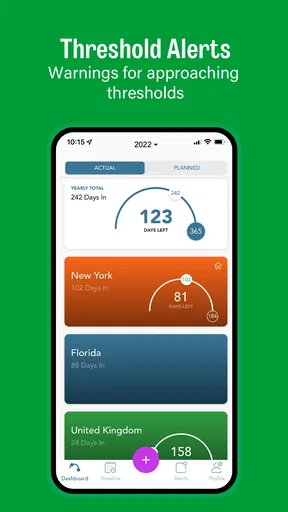
Notifications are another highlight. You can customize them to alert you when you’re nearing your limit in a particular state. It’s like having a friendly nudge to remind you of your residency goals. This feature can save you from unexpected tax surprises.
Who benefits most—and who may not
I see the strongest fit for people whose schedules are genuinely divided among several places: remote workers who move between homes, seasonal residents, frequent business travelers, or anyone who spends meaningful time in different states or provinces. For them, a location-based running record may reduce the effort of piecing together a year from memory. The reminder angle is especially useful when a planned stay is flexible and a few extra days could matter.
By contrast, I would skip a dedicated tracker if my travel is rare and easy to document in a calendar, or if I need a full tax-preparation workflow rather than a way to monitor days. It is also not the right sole record for someone who needs evidence suitable for a complex audit or dispute. In those cases, I would pair any automated count with dated travel documentation and professional guidance instead of assuming an app’s summary resolves the issue.
Privacy, permissions, and practical trade-offs
I know what you’re thinking—"Is my data safe?" Rest assured, TaxBird has got you covered. The app doesn’t share your location data with third parties, and all your information is encrypted. In today’s age, data privacy is paramount, and it’s comforting to know that the app takes it seriously.
Even when a location tool is useful, background tracking is a meaningful choice because it involves ongoing access to sensitive movement information. I would decide deliberately whether automatic tracking is worth that convenience, check the permission choices during setup, and revisit them if my routine changes. If I prefer not to share location access continuously, a manual calendar may feel more comfortable, though it asks me to keep up with entries myself.
Another sensible habit is to make a periodic personal note of unusual travel days. GPS-based records can be helpful for organizing movement, but a phone’s location history should not be treated as infallible proof of every border crossing or tax-relevant event. A quick cross-check after an itinerary change is a small effort that makes the overall record more useful.
Value for Money
While the app isn’t free, I’d say it’s a worthy investment for anyone who needs to keep a close eye on their residency status. Imagine the hassle and potential costs of getting your taxes wrong due to incorrect residency tracking. The peace of mind alone is worth every penny.
The app offers a free trial, which I recommend taking advantage of if you’re on the fence. Test it out, see how it fits into your routine, and then decide if it’s worth the subscription.
In the store, the app is listed as free to install, with optional in-app purchases priced from $1.49 to $39.99 per item. I would check the purchase screen carefully before committing, since the right choice depends on how often I travel and how much I value automated tracking over a calendar-based routine. Its average rating is 4.0 from 104 ratings, with 26 written reviews, and it has passed 10K+ installs. Those figures suggest a modest, established audience rather than a universal travel essential.
How it compares with the usual alternatives
The main alternative is a spreadsheet or calendar. Those can be perfectly adequate for a person with a stable, simple travel pattern, and they offer direct control over every entry. Their weakness is that they depend on consistent manual upkeep; a missed return date can make later totals less dependable. A broad travel diary may preserve destinations and plans, but it is not necessarily organized around residency-day monitoring.
TaxBird’s advantage is the focused combination of location tracking, day counts, a monthly overview, and threshold reminders described in the app experience. That focus is a better match for someone who needs to monitor several jurisdictions than a general finance app. A tax professional or specialist service, however, is the better alternative when the question is how a particular residency rule applies, rather than how many days a phone recorded in a place. I would think of these options as serving different jobs, not as interchangeable products.
Switching without losing the thread
If I move from a spreadsheet or another routine to this app, I would avoid assuming the new record automatically replaces the old one. I’d keep the earlier calendar or travel notes available, compare a known period, and make sure the totals seem consistent before relying on the new workflow. That simple overlap is useful because it can expose a setup misunderstanding while the dates are still easy to verify.
Likewise, anyone leaving the app should preserve whatever personal records they need for future reference before changing their tracking habits. Residency questions can arise well after a trip, so I would not make an app the only place where important travel history exists. Maintaining a separate calendar or saved itinerary is a low-effort safeguard, especially for someone with frequent or complicated travel.
Final Thoughts
In conclusion, TaxBird - Residency Tracker is a nifty tool for anyone juggling multiple residencies. It’s user-friendly, reliable, and keeps you informed every step of the way. Whether you’re a frequent flyer, a snowbird, or someone with multiple homes, this app can be a lifesaver come tax season. Give it a shot—you might just find it’s the app you didn’t know you needed!
There is one practical caveat to keep in view: the app helps organize days, while tax residency can involve rules and facts beyond a location count. Its age rating is Everyone, and the current version is 2.8.3; it was released on July 11, 2019. It requires iOS 11 or later. Those details make it straightforward to judge basic compatibility, but the best reason to install it is still your own travel pattern, not the promise of a shortcut through tax decisions.
My recommendation is clear: if you routinely divide your time across states, provinces, or countries and want a convenient running record, this is worth trying and evaluating against your actual trips. If your movements are occasional, a calendar may be simpler; if you need a legal interpretation, consult a tax professional. Used for the job it is built to support, it can turn a fuzzy year of travel into a more manageable record without asking you to confuse tracking with tax advice.
Pros
- User-friendly interface for easy navigation.
- Accurate location tracking with minimal battery use.
- Customizable alerts for travel thresholds.
- Detailed reports for tax filings and audits.
- Cloud backup ensures data safety and accessibility.
Cons
- Limited to US residency tracking only.
- Requires constant location access.
- Subscription model can be pricey.
- No integration with other tax apps.
- Occasional GPS inaccuracies in dense areas.
FAQs for TaxBird - Residency Tracker
What is TaxBird and what does it do?
TaxBird is a residency tracking app designed to help users keep track of their time spent in different states. It's particularly useful for individuals who need to manage their state residency for tax purposes, ensuring compliance with different states' residency rules and avoiding potential tax issues.
How does TaxBird track my location?
TaxBird utilizes your device's GPS technology to automatically track your location. This allows the app to log your days spent in various states accurately. Users can review and adjust logged days manually if needed, offering both automation and flexibility in tracking.
Is my personal data safe with TaxBird?
Yes, TaxBird prioritizes user privacy and data security. The app uses encryption to protect your location data and does not share your information with third parties without your consent. Users can also control their privacy settings within the app to enhance security.
Can TaxBird handle multi-state residency tracking?
Absolutely. TaxBird is designed to manage residency tracking across multiple states. It helps users identify how many days they've spent in each state and alerts them when they are nearing the residency threshold, ensuring they remain compliant with tax regulations.
Is TaxBird user-friendly for beginners?
Yes, TaxBird is designed with a user-friendly interface that is easy for both beginners and advanced users. The app offers a straightforward setup process, clear instructions, and intuitive navigation, making it accessible for anyone needing to track their residency days efficiently.


